Corral v0.1: a portable Proxmox for people who already have a cluster (or just a laptop)

I love Proxmox. I have run it for years. But Proxmox is a distribution. It owns the full machine, and Debian holds it tight. If your infrastructure has moved to Kubernetes, Proxmox becomes a second world. You must maintain it next to the first one.
Corral is my answer to a question I could not put down. The Proxmox experience has a datacenter tree, a create wizard, consoles that open with one click, and VMs beside containers. What if all of it were one static binary? You would point that binary at the infrastructure you have.
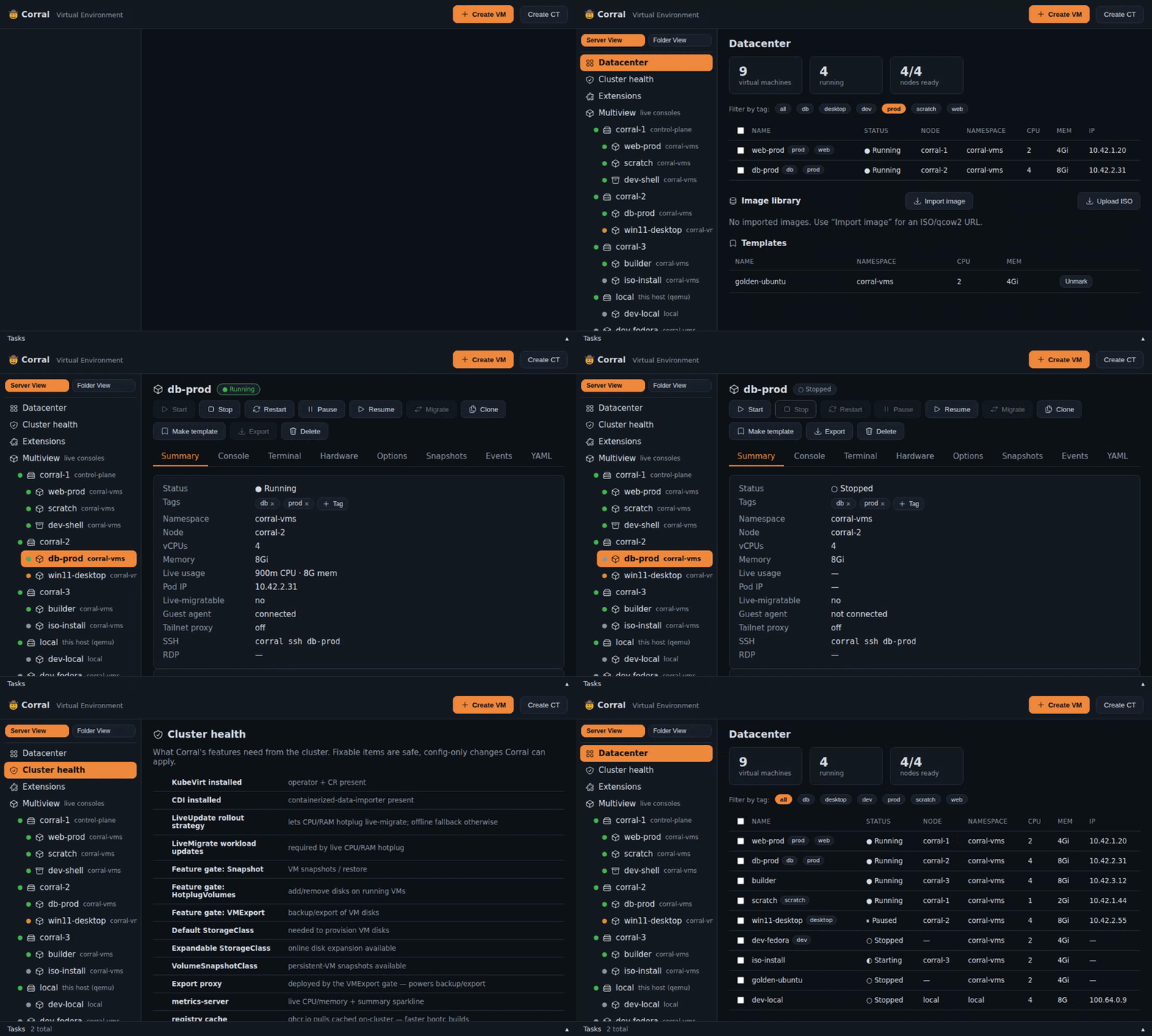
The short version:
- Got a Kubernetes cluster? Corral drives KubeVirt through
kubectlandvirtctl— no operator to install, no agent, no CRDs of its own. - Only a laptop? The same commands run VMs on local QEMU/KVM under systemd. From this week, the same dashboard shows them under a "local" node.
- Got Tailscale? Every VM lands on your tailnet automatically — SSH from your phone, VNC from the couch.
One binary. create / start / ssh / viewer / clone / delete work
identically on both backends, and Corral remembers which VM lives where.
There is a TUI for quick jobs, and a Proxmox-style web dashboard for
everything else. There is also a compatibility layer for the Proxmox API, if
your Terraform provider needs one.
And to be clear about what "one binary" means: the CLI, the TUI, and the
web UI are all in it. brew install tuna-os/tap/corral-vm and you have the
whole product — there's no separate web package or frontend build to deploy.
Try it in 30 seconds, literally no cluster
curl -fsSL https://raw.githubusercontent.com/tuna-os/corral/main/scripts/install.sh | sh
corral --demo        # the TUI
corral web --demo    # the dashboard, on Proxmox's port naturally (8006)
--demo boots a fake cluster in memory, inside the binary. It has three
nodes and eight VMs. Those VMs show each state you meet in real life. Some run and some do not. One shows a pause, one shows a part-installed system,
and one shows a Windows desktop at a pause. One more is an ephemeral scratch VM whose TTL
decreases.
The demo cluster also has two containers and live CPU metrics.
This is not a mockup. The real CLI, the real TUI, and the real web UI run their own code against it, and the state is live. Stop a VM in the dashboard, and the TUI agrees.
I built it to improve the interfaces without a cluster, and it became the best
introduction to Corral that we have. It's also how CI drives
the frontend now — a headless browser clicks through the real dashboard
against --demo on every change.
The part I care most about: your OS is a container image
This is the TunaOS connection. Point Corral at a bootable container image:
corral create dev --bootc ghcr.io/tuna-os/yellowfin:gnome --wait-ssh
It runs bootc install to-disk in a builder VM on the cluster, then boots
the result as a first-class VM. Your OS lives in a registry;
corral bootc upgrade moves the VM to the next build. Every TunaOS image —
and every Universal Blue image, and anything else bootc-bootable — becomes a
VM you can summon with one command. Proxmox structurally can't do that.
Containers get the Proxmox treatment too
corral ct create makes a "pet pod" — a plain Kubernetes pod with a
persistent volume and an init process, presented like a Proxmox CT. In
privileged mode it seeds a full root filesystem onto the volume,
distrobox-style, so apt install survives a restart. There's even
corral ct create myproj --devcontainer ./myproj if your project already
has a devcontainer.json.
Honest state of things
v0.1.x, five weeks old. The KubeVirt backend is the most exercised path; local QEMU in the web UI landed this week (lifecycle + info; consoles still route through the CLI). Windows VMs, GPU passthrough, and scheduled snapshots and backups are plugins. They are not all equally mature.
Do you run VMs on Kubernetes, and miss the way Proxmox feels? Or do you run
Proxmox, and want one binary in place of an operating system? Give
corral --demo thirty seconds. That is the pitch.
Corral is Apache-2.0 at github.com/tuna-os/corral. Stars are welcome: they are the gate to homebrew-core.