index
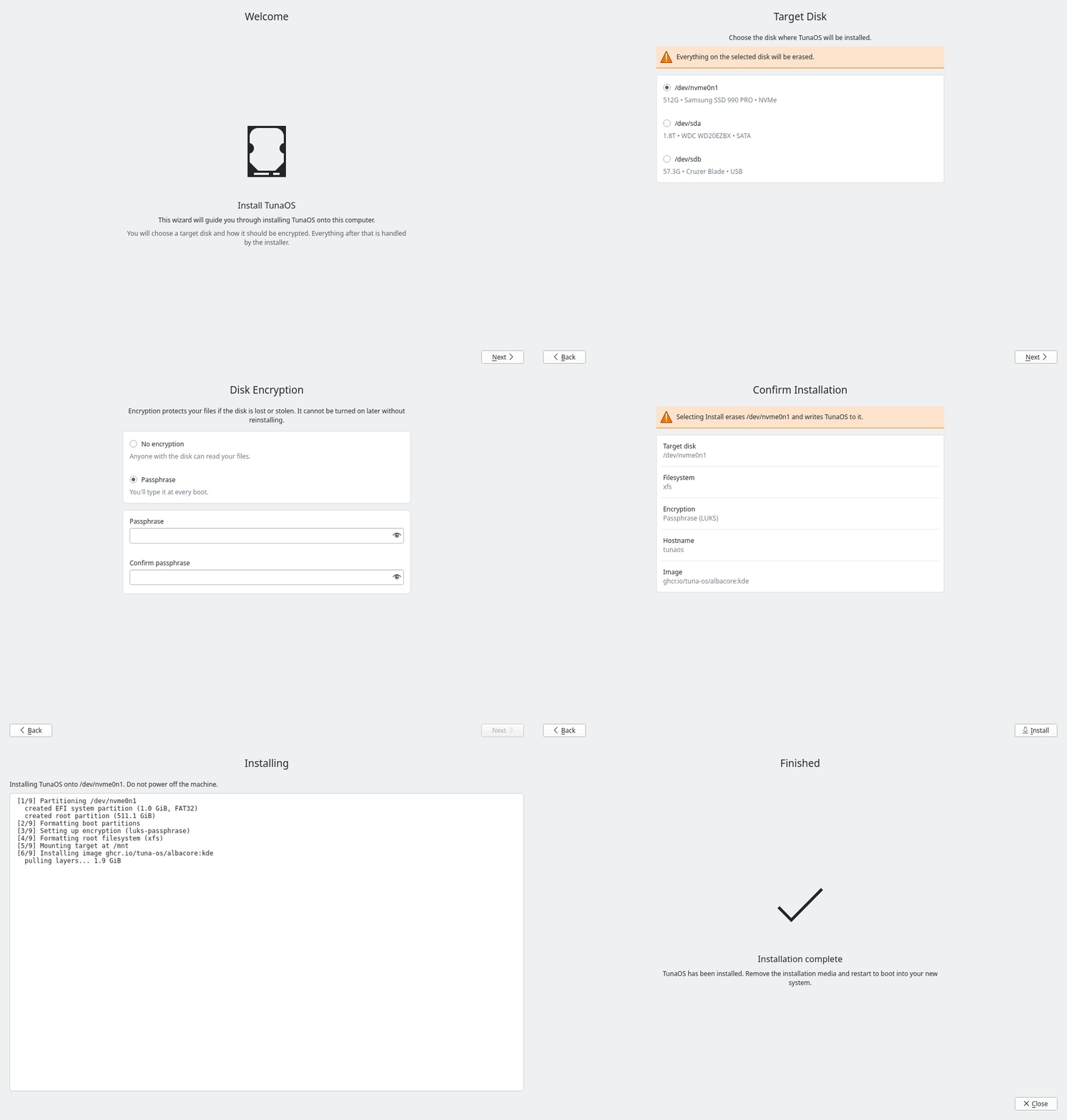
Rendered in CI from the real wizard — see the walkthrough.
Thin Qt 6 / Kirigami wizard that drives the fisherman bootc install backend.
The UI is built the way KDE's own initial-setup wizard
(KISS, landing in Plasma 6.5) is built: each step
is a self-contained module at modules/<name>/contents/ui/main.qml whose root
is a SetupModule exposing nextEnabled and contentItem, driven by
src/qml/Wizard.qml with hand-rolled slide animations rather than a SwipeView.
Kirigami, Kirigami Addons (FormCard) and Kirigami.Units throughout — no
hardcoded pixel metrics, and no more forced Fusion style.
Workflow
- Welcome — brief intro
- Target Disk —
lsblk -Jlists available disks; user picks one - Disk Encryption — none / passphrase / TPM / TPM + passphrase
- Confirm — summary of choices (disk, filesystem, encryption, hostname, image)
- Installing — writes recipe JSON, runs
fisherman <recipe.json>, streams output - Finished — success/failure with close button
Build
# Dependencies (Fedora). Kirigami and Kirigami Addons are QML-only: nothing
# links against KF6, they are resolved at runtime from the QML import path.
sudo dnf install -y cmake gcc-c++ ninja-build \
    qt6-qtbase-devel qt6-qtdeclarative-devel \
    kf6-kirigami kf6-kirigami-addons kf6-qqc2-desktop-style breeze-icons

# Build
cmake -B build -DCMAKE_BUILD_TYPE=Release
cmake --build build

# Run
./build/tuna-installer-kde
Running Tests
Backend Unit Tests
Build and execute the CTest / QtTest backend suite (tuna-installer-backend-tests):
cmake -B build -DCMAKE_BUILD_TYPE=Debug -DBUILD_TESTING=ON
cmake --build build
ctest --test-dir build --output-on-failure
# Or run directly:
./build/tuna-installer-backend-tests
Screenshot Capture Harness
Build the offscreen QML screenshot capture executable (tuna-installer-capture):
cmake -B build -DCMAKE_BUILD_TYPE=Release -DBUILD_CAPTURE=ON
cmake --build build
./build/tuna-installer-capture
Recipe
The installer writes a JSON recipe that fisherman consumes:
{
  "disk": "/dev/nvme0n1",
  "filesystem": "btrfs",
  "btrfsSubvolumes": true,
  "encryption": {"type": "luks-passphrase", "passphrase": "…"},
  "image": "ghcr.io/tuna-os/albacore:gnome",
  "additionalImageStores": ["/usr/share/tuna-installer/oci-store"],
  "distroID": "tunaos",
  "selinuxDisabled": true,
  "hostname": "tunaos"
}
Encryption types: none, luks-passphrase, tpm2-luks, tpm2-luks-passphrase.
On a live ISO, image may be omitted — bootc installs the running container
(offline, no download). See the
installer frontend contract
for the shared recipe and screen contract.
License
GPL-3.0-only