index
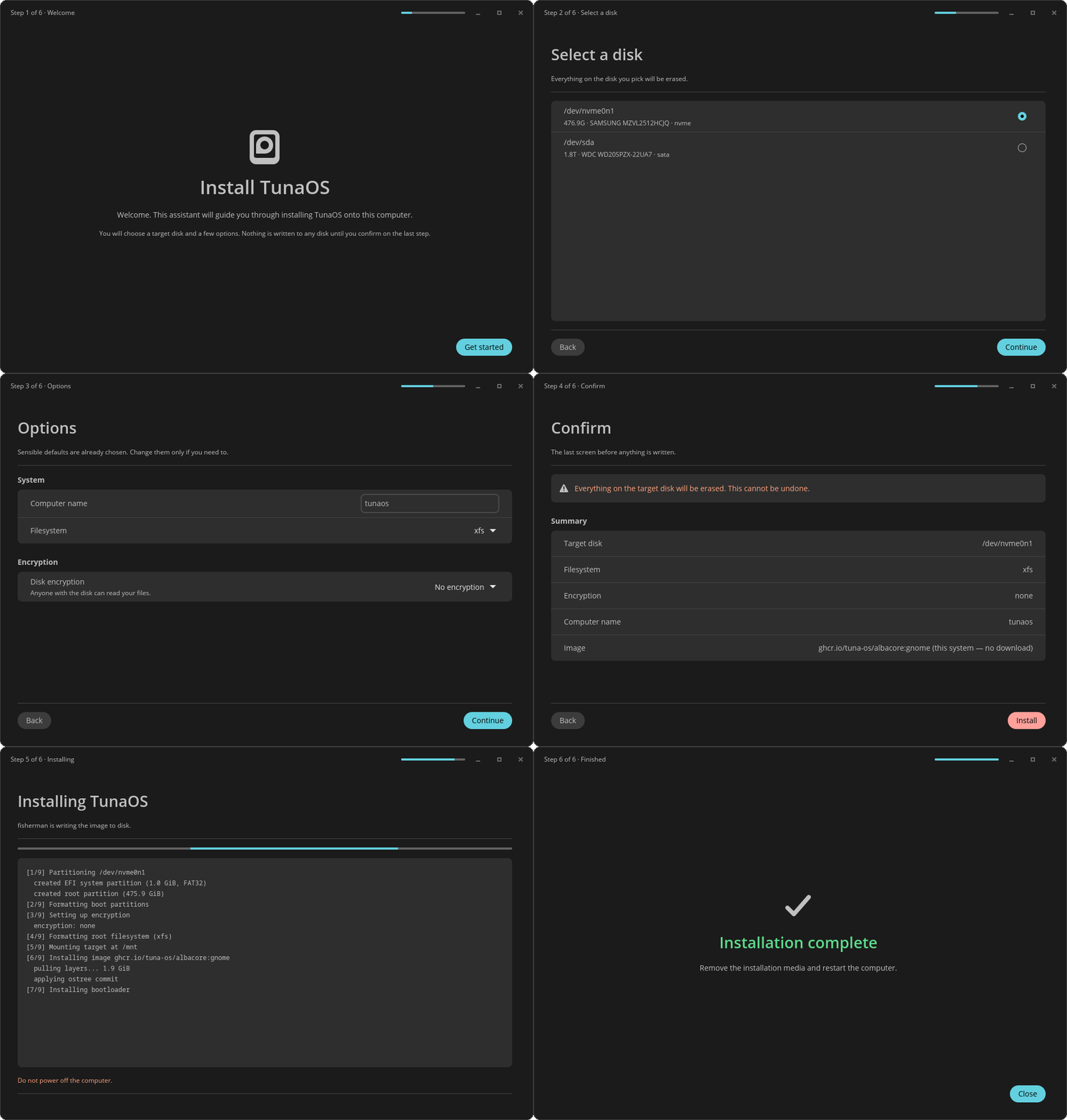
Every frame is rendered in CI from the real libcosmic app — see the step-by-step walkthrough.
A real COSMIC application: cosmic::Application, the COSMIC header bar,
the cosmic widget set and the cosmic-theme palette. It drives the
fisherman bootc install backend.
Previously this crate was plain
icedwith.theme(|_| Theme::Dark)hardcoded and nolibcosmicdependency at all, which is why it never looked like a COSMIC app — the styling was not "missing", it was never wired up. It also did not compile: the source targeted the iced 0.13 API whileCargo.tomlasked for 0.14, and no CI job ever rancargo build.
Workflow
- Welcome — brief intro
- Select a disk —
lsblk -Jlists available disks; user picks one - Options — computer name, filesystem, encryption
- Confirm — summary of choices, under a warning banner
- Installing — writes recipe JSON, runs
fisherman, streams output - Finished — success/failure
Build
# libcosmic needs these headers even when it will run under X11.
sudo apt-get install -y pkg-config cmake clang \
  libwayland-dev libxkbcommon-dev libfontconfig-dev libfreetype-dev \
  libinput-dev libudev-dev libgbm-dev libegl1-mesa-dev libssl-dev

cargo build --release
cargo run --release
Recipe
Produces the same JSON recipe as the Qt/KDE installer.
License
GPL-3.0-only
Flatpak
# Regenerate the offline cargo sources for flatpak-builder.
# NOT one-time: re-run this in the same commit as any Cargo.lock change.
just cargo-sources

flatpak-builder --user --install --force-clean build flatpak/org.tunaos.InstallerCosmic.json
flatpak run org.tunaos.InstallerCosmic
The recipe downloads flatpak-cargo-generator.py from
https://github.com/flatpak/flatpak-builder-tools/tree/master/cargo and runs it
against Cargo.lock. It must be the generator and not cargo vendor, because
the lockfile pulls ~50 packages from git (libcosmic, winit, accesskit,
cryoglyph, …) and only the generator emits the [source."<git url>"] replace-with stanzas that let cargo --offline build resolve them.
If flatpak/cargo-sources.json falls behind Cargo.lock, the Flatpak build
fails inside flatpak-builder with either perhaps a crate was updated and forgotten to be re-vendored? or can't checkout from '<git url>': you are in the offline mode (--offline).
That used to be discovered on main, after the merge — Build Flatpak OCI
only runs on push — which is how main stayed red for 14 consecutive runs while
Renovate automerged six lockfile bumps on top of stale sources. It is now gated
on the PR by .github/workflows/cargo-sources.yml, which asserts that every
package in Cargo.lock is vendored in the JSON and that every git remote has
its replace-with stanza. Run the same check locally:
just check-cargo-sources
Offline installs
On a TunaOS live ISO the installer detects the booted bootc image
(bootc status) and installs it without a download (empty image in the
recipe). Embedded OCI stores listed in /etc/tuna-installer/offline-stores
(or $TUNA_OFFLINE_STORES, default /usr/share/tuna-installer/oci-store)
are passed to fisherman as additionalImageStores.
Contributing
See CONTRIBUTING.md for detailed guidelines on local setup, running verification commands (just check, just check-cargo-sources), and screenshot capture tests (just capture).
Screenshots
docs/screenshots/ is regenerated by .github/workflows/screenshots.yml from
the real UI, and uploaded as an artifact on every PR that touches src/
— including when the capture fails, which is when the picture is most needed.
Locally:
sudo apt-get install -y mesa-vulkan-drivers xvfb imagemagick
just capture
Capture mode is entered only by setting TUNA_CAPTURE_DIR. In that mode the
app uses fixture disks, never shells out to lsblk/bootc/podman, and
refuses StartInstall outright — driving the wizard to the install screen
cannot start an install. The harness reads back the frame wgpu actually
presented and fails if any screen did not really render.