index
Grab the latest build from the tuna-os/iso-builder releases page. See the User Guide for a full walkthrough.
⚠️ Alpha — unsigned builds, interfaces below will change. See Known limits.
A cross-platform desktop app — Linux, macOS, and Windows — that writes a real bootc image straight to a USB drive using tacklebox, no browser sandbox involved. This is the un-hacky alternative to Ventoy: instead of chainloading arbitrary ISO files, it installs a real bootable environment onto a persistent, extendable multi-boot drive — plug the same stick back in later and add another OS, update one in place, or remove one to reclaim space, all without reformatting.
Why not just burn an ISO?
An ISO burner is one-shot: write it, and the drive is now exactly one OS, forever, until you erase it and start over. This app instead manages the drive the way a package manager manages packages:
-
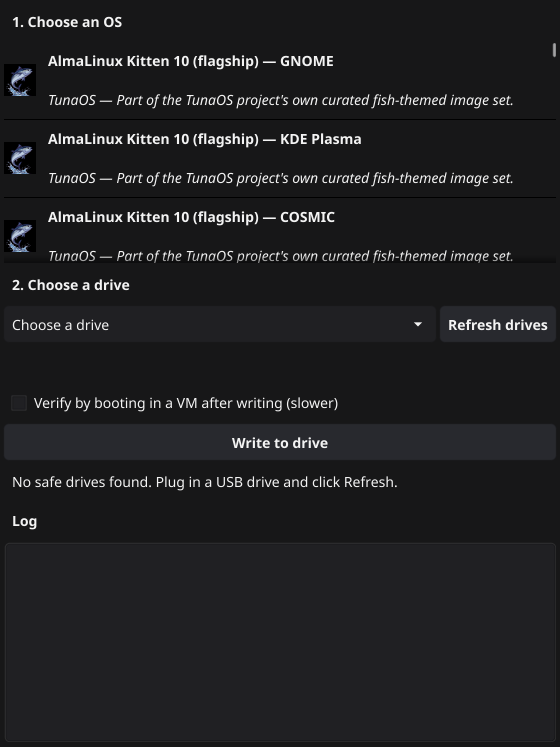
Plug in a USB drive. The app detects whether it's blank or already has TunaOS environments on it, and defaults accordingly — "Write to drive" for a blank stick, "Add to drive" for one it recognizes.
-
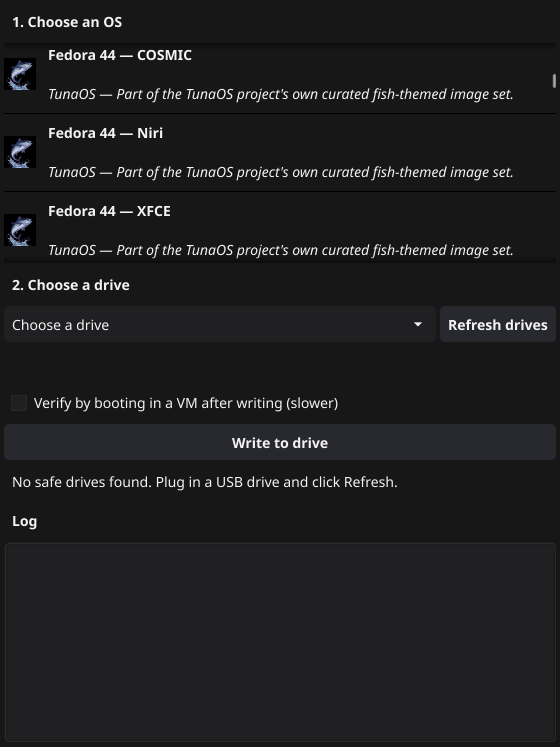
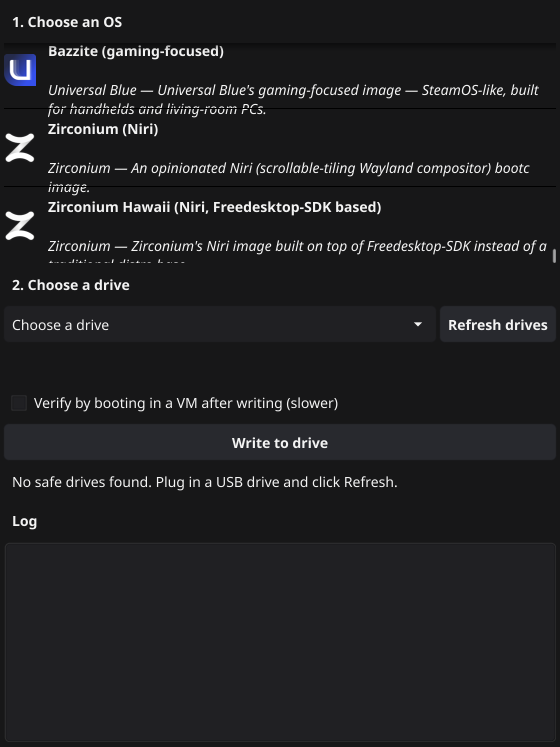
Pick from a real, multi-project catalog — a card per entry with that project's real logo, name, and description, not a plain dropdown. TunaOS's own variants (the same set the browser ISO Builder offers, across GNOME, KDE Plasma, COSMIC, Niri, and XFCE), plus curated images from Project Bluefin, Universal Blue (Aurora, Bazzite, Bluefin DX), and Zirconium — every reference checked live against the publishing project's actual registry, not guessed.
-
Day-2 lifecycle, not just day-1. Once a drive is managed, a "Manage this drive" panel appears with Verify, Update, and Remove — the same primitives
tacklebox's CLI exposes, wrapped in a GUI a non-technical user can actually drive. -
Optional boot verification. Tick "Verify by booting in a VM after writing" (Linux only for now) and the app boots the freshly-written drive in a throwaway QEMU VM to confirm it actually reaches userspace, instead of trusting a zero exit code alone.
-
Debug view into macOS's helper VM. Its write path boots a headless VM behind the scenes — click "View VM console (debug)" while an operation is running to see its actual screen in your browser via a bundled noVNC client, for the rare case something goes wrong in a way SSH-streamed logs don't capture.
How it actually writes the drive, per platform
bootc install needs real Linux kernel semantics — ostree, composefs,
chattr +i immutable bits — that don't exist natively everywhere:
| Platform | How it gets a real Linux kernel |
|---|---|
| Linux | Already has one. Runs tacklebox directly. |
| macOS | Boots a small, ephemeral QEMU VM (downloaded once, cached after), attaches the USB drive to it as a virtio block device, and runs tacklebox inside. |
| Windows | Uses WSL2 (a real, Microsoft-maintained Linux kernel already built into Windows 10 2004+/11) plus usbipd-win to attach the USB drive into it. |
Missing prerequisite (WSL2, QEMU, usbipd-win)? The app detects it and offers a one-click install rather than a dead-end error — this tool is built for people who don't want to open a terminal.
Known limits
- Unsigned builds. macOS needs a right-click → Open the first time (Gatekeeper); Windows needs "More info" → "Run anyway" (SmartScreen). Proper code signing is planned once there's a real release channel.
- Boot verification is Linux-only. macOS and Windows already run the write itself inside a VM/WSL2; nesting a second VM boot-check inside that isn't supported yet.
- Windows and macOS pay a real first-use cost. Booting the helper VM (macOS) or attaching via WSL2 (Windows) takes real time compared to Linux's direct path — worth it for the same drive-management capabilities everywhere, but not instant.
Source
Part of tuna-os/iso-builder
(native/) — built on tacklebox,
the same engine behind the browser ISO Builder and TunaOS's own
release media.
Part of the Tuna OS ecosystem.