user guide
Welcome to the comprehensive user guide for Corral — the unified management platform for virtual machines, pet-pod containers, and local hypervisors.
Backends, contexts, and peers
corral config set-default-backend incus makes unqualified creates use
Incus. corral context list|set|get switches Corral's context and does not
change kubectl or the Incus CLI; --context is a one-shot override.
Libvirt URIs make remote QEMU a normal backend, for example:
corral context set qemu+ssh://hypervisor/system.
A local dashboard can aggregate an in-cluster Corral without a local
kubeconfig: corral peer add homelab https://corral.example.ts.net.
Console routing tries the VM's advertised direct address first and relays
through the peer only when direct access is unavailable.
1. Overview & Architecture
Corral brings together diverse virtualization and container workloads under a single interface, CLI, and Tailscale network.
flowchart TD
    User([User / CLI / Web UI]) --> Corral[Corral Core]

    subgraph Backends
        Corral --> QEMU[QEMU / KVM Local]
        Corral --> KubeVirt[KubeVirt / Kubernetes]
        Corral --> CT[Pet-Pod CT / K8s]
        Corral --> Incus[Incus / LXC and VMs]
        Corral --> Libvirt[libvirt local or SSH URI]
        Corral --> Proxmox[Proxmox VE cluster]
        Corral --> Peer[Remote Corral peer]
    end

    subgraph Access Layer
        QEMU --> Tailnet[Tailscale Tailnet]
        KubeVirt --> Tailnet
        CT --> Tailnet
        Incus --> Tailnet
        Libvirt --> Tailnet
        Proxmox --> Tailnet
        Peer --> Tailnet
    end
Supported Compute Backends
| Backend | Scope | Tech Stack | Use Case |
|---|---|---|---|
| QEMU | Local Host | QEMU / KVM + systemd | Fast, local ephemeral or dev VMs on your workstation |
| KubeVirt | Cluster | KubeVirt + Kubernetes | Production VMs with live migration, PVC storage, and scaling |
| Container (CT) | Cluster | Kubernetes Pod + PVC | "Pet Pods" — persistent Linux containers (Distrobox on K8s) |
| Incus | Local or remote | Incus remote | Containers and VMs managed through existing Incus trust |
| libvirt | Local or remote | libvirt URI / OpenSSH | Existing domains and remote QEMU hypervisors |
| Proxmox VE | Cluster | Proxmox VE HTTPS REST API | VMs and LXC containers managed on existing PVE clusters |
2. Interactive Interfaces
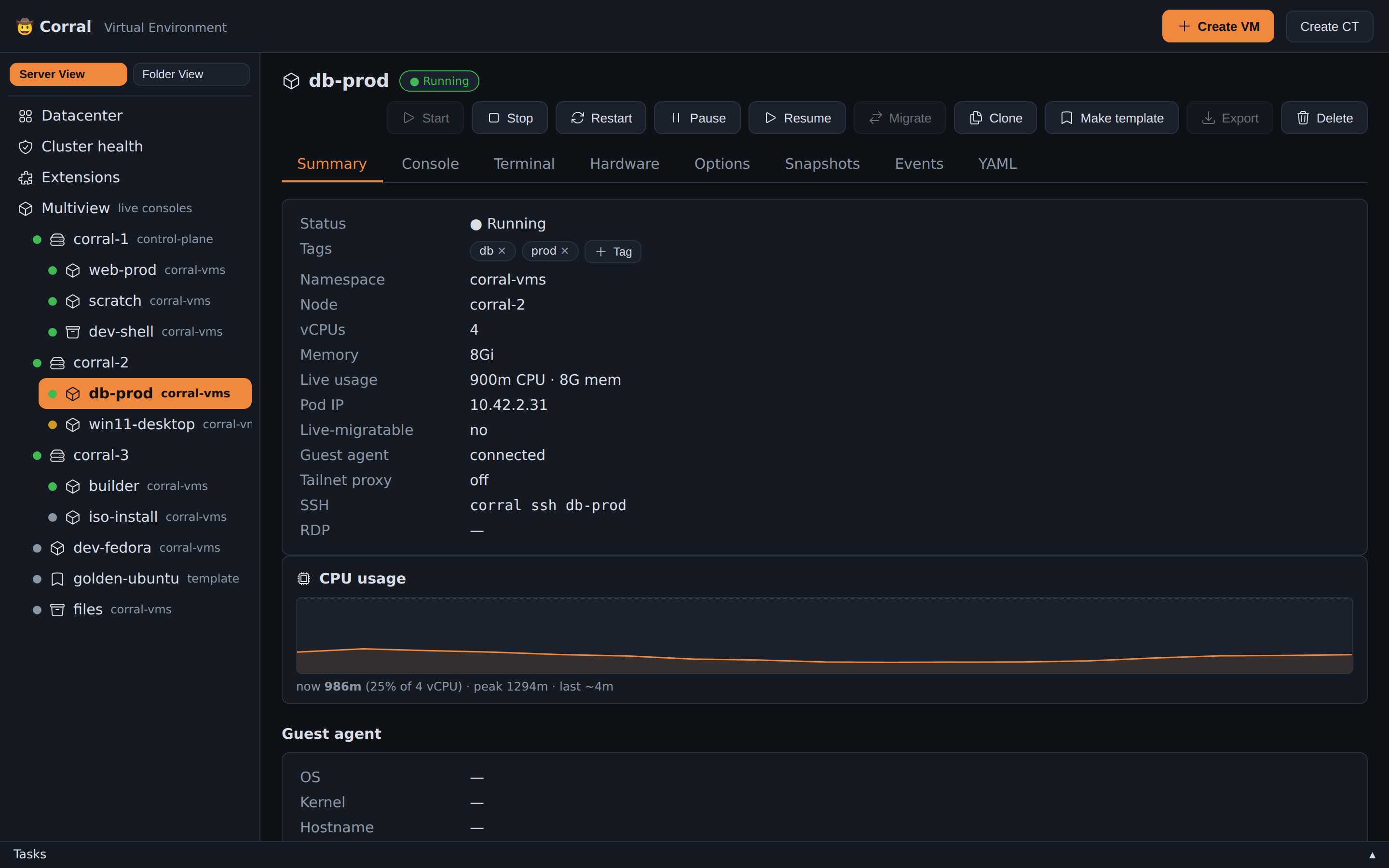
Web Dashboard
Access the Proxmox-style Web UI at http://localhost:8006 or via corral web.
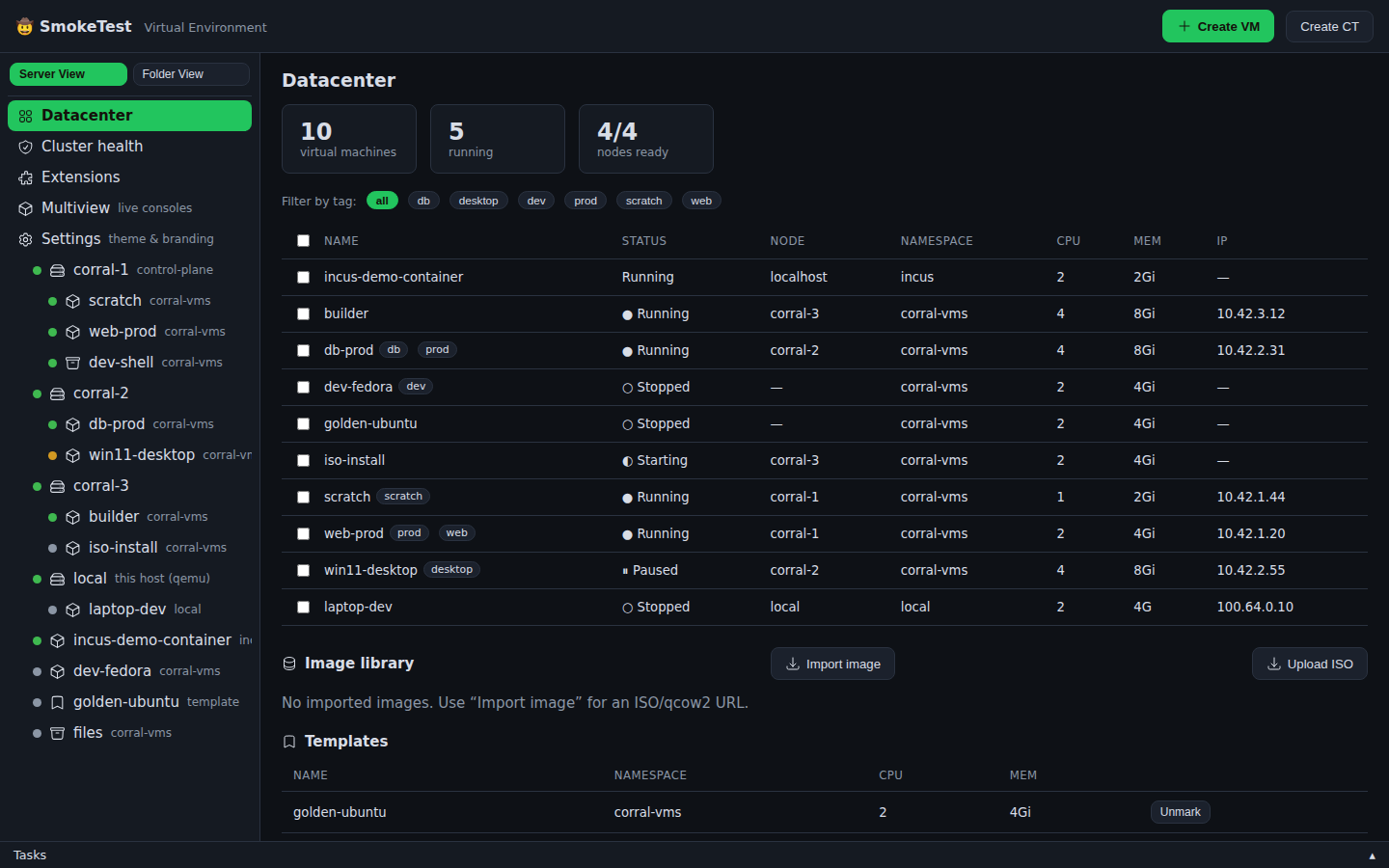
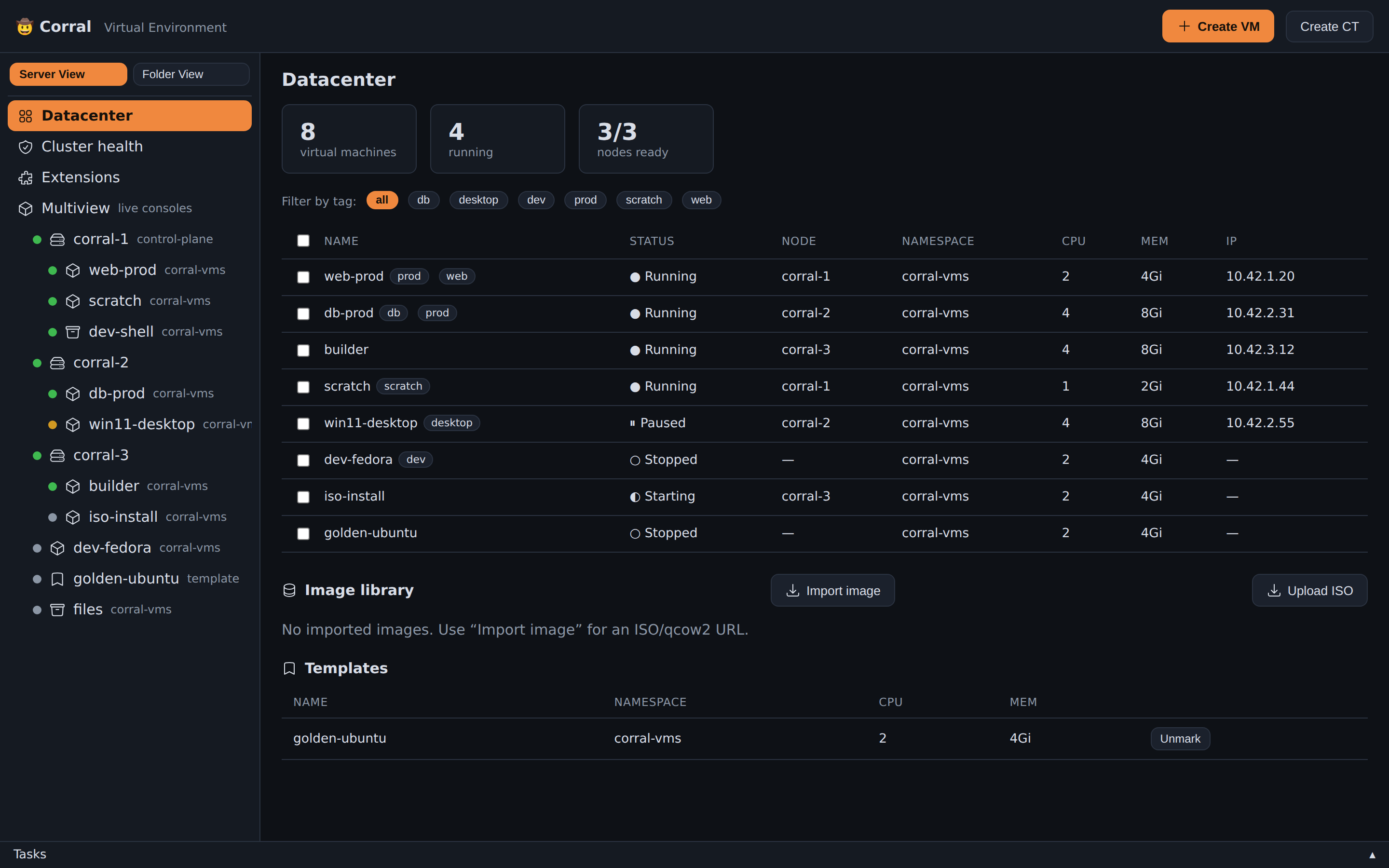
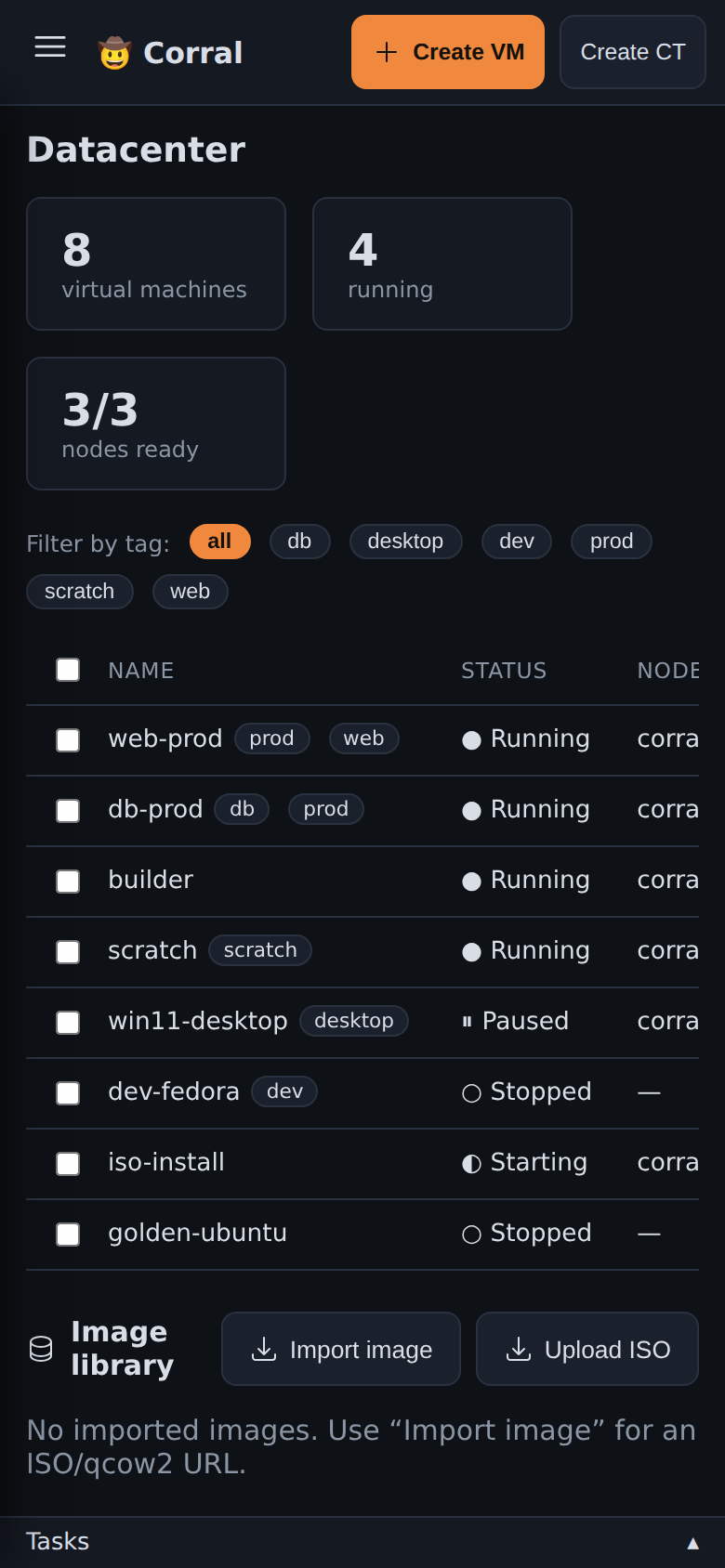
Features:
- Datacenter Tree: Navigate through all VMs, CTs, and Incus instances across local and cluster nodes.
- Live CPU & Memory Sparklines: Real-time load graphs for each VM.
- Tag Filters: Filter instances by custom tags (
prod,dev,desktop). - Mobile Responsive: Manage your VM fleet from your mobile browser.
- Theme & Brand: Customize accent colours and the header brand, and inject custom CSS. Use CLI flags, a config file, or the built-in Settings page.
Web keyboard shortcuts
Press Ctrl+K (⌘K on macOS) to open the command palette. Type part of a
name to find a VM, a CT, a node or a pool. Type a verb and a name to find an
action, for example stop web-prod. Press Enter to run the first result.
The items that you used last show at the top of the list.
| Key | Action |
|---|---|
Ctrl+K | Open the command palette |
? | Show the list of shortcuts |
/ | Filter the tree by guest name |
c | Open the console of the selected VM |
s | Start or stop the selected VM |
g then d | Go to the datacenter |
The one-key shortcuts do not operate when you type in a field or in a console. A read-only user does not see the actions that change a guest.
Theme & Branding
In Corral's web UI, you can fully customize the accent colour, the header brand, and custom CSS. You need no source-code changes.
CLI flags (highest priority, override everything):
corral web --accent \"#3b82f6\" --brand-title \"My Lab\" --brand-emoji \"⚡\" --brand-subtitle \"Engineering\"
Config file (~/.config/corral/config.yaml, loaded on startup):
web:
  accent: \"#22c55e\"        # CSS hex colour
  accent_2: \"#16a34a\"      # hover/active variant
  brand_title: \"My Lab\"
  brand_emoji: \"⚡\"
  brand_subtitle: \"Engineering\"
  custom_css: |
    .btn.primary { border-radius: 20px; }
    .card { background: var(--panel-2); }
Settings page (web UI → Settings in the sidebar):
- Colour picker with preset swatches (Orange, Blue, Green, Purple, Red, Amber)
- Brand title, emoji, and subtitle fields with live header preview
- Custom CSS textarea that injects styles immediately as you type
- Save button persists to
config.yaml
Precedence: CLI flags > config.yaml > built-in defaults (🤠 Corral, orange accent).
Terminal UI (TUI)
To launch the interactive TUI (built on Bubble Tea), run corral with no arguments. To explore in demo mode, run corral --demo.
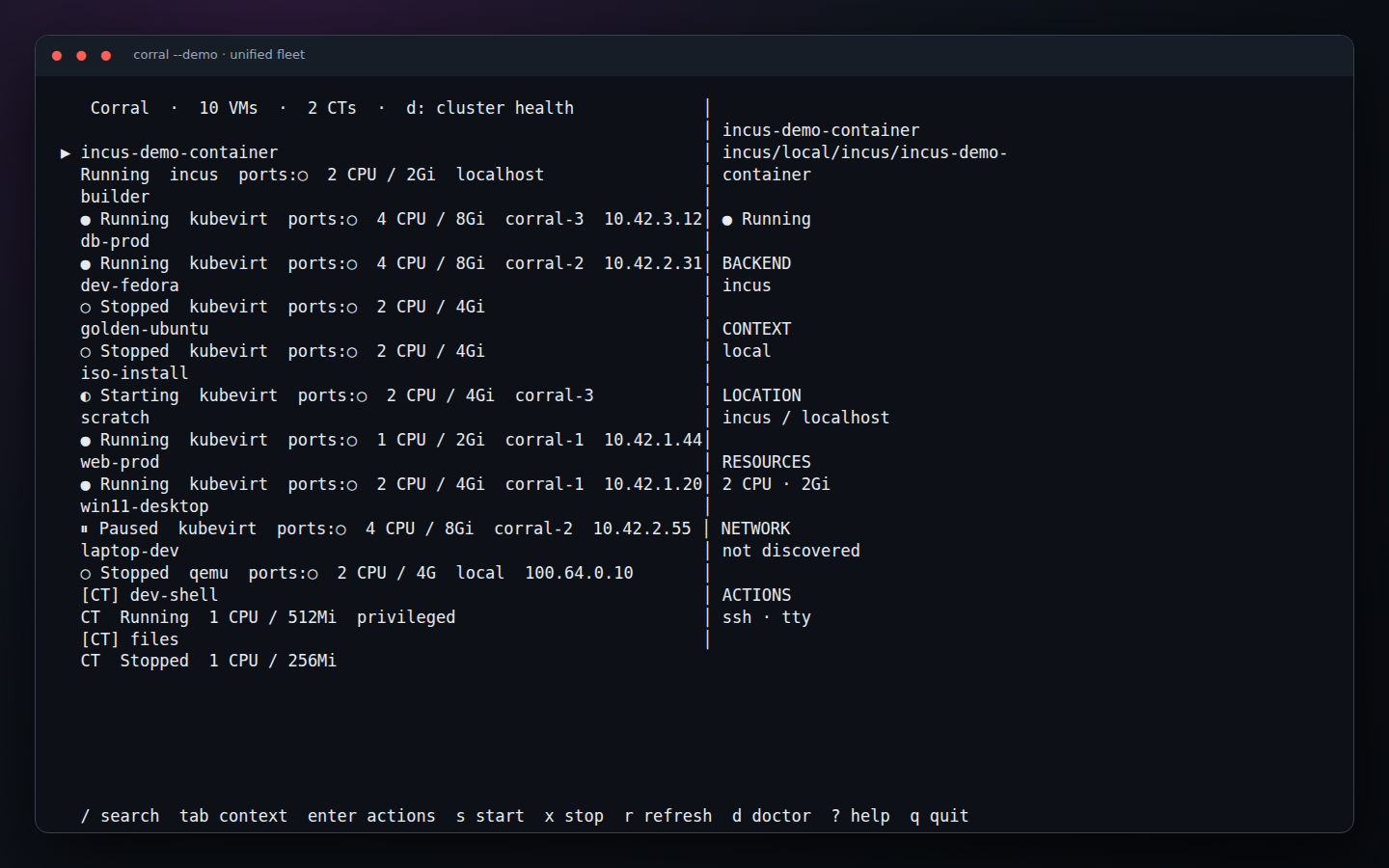
The left side is a unified, searchable fleet. Wide terminals add a details pane with canonical ID, backend/context, placement, address, resources, and available operations. Failed remotes appear as partial-fleet warnings without hiding healthy instances.
TUI keyboard shortcuts and features
/fuzzy-searches names, canonical IDs, backends, contexts, nodes, and IPs.Tab,[and]cycle between the complete fleet and named contexts.Enteropens a capability-aware action menu. The menu leaves out unsupported operations, so they do not fail after you select them. These all live there: power (start/stop/restart/pause/resume), migrate, clone, snapshots, and events. So do the template mark, CPU/RAM, published ports, export, SSH, VNC, and delete.- Snapshots opens the instance's captures:
ntakes one (named or auto-named),Enterrestores,xdeletes,rreloads. Corral supports every backend that can snapshot: KubeVirt, libvirt, Incus, and local QEMU. Each capture reports what it caught (offline, filesystem, or crash-consistent). This is the same as the web UI's Snapshots tab. - Events shows the recent Kubernetes events for a KubeVirt VM and its
virt-launcherpod, newest first. - Make/Unmark template flips the golden-template label that
corral clonecopies from. - CTs get their own smaller menu — start, stop, console, CPU/RAM, delete.
sandxquickly start or stop the selected VM;rrefreshes every backend.druns scoped QEMU, KubeVirt, Incus, and libvirt diagnostics.- The mouse works too. Click a row to select it, and scroll with the wheel. Double-click to open its actions (or to run the highlighted one). A click on a port row in the ports form toggles it. Destructive actions still go through their confirmation — a double click can't reach anything a keypress can't.
?opens the in-app command deck.- QEMU, KubeVirt, Incus, libvirt, and pet-pod CTs share the inventory without losing their backend-specific capabilities.
3. Core Feature Walkthrough
1. Instance Lifecycle Management
Create and manage instances across any backend with identical commands:
# Create local QEMU VM
corral create dev-vm --iso https://example.com/ubuntu.iso --disk 40G

# Create KubeVirt cluster VM
corral create prod-vm --kubevirt --image fedora

# Create on an existing Incus remote
corral create fast-ct --backend incus --context lab --image images:ubuntu/22.04

# Universal operations
corral start dev-vm
corral stop dev-vm
corral delete dev-vm
2. Remote Access: VNC, RDP & TTY
Corral provides single-command remote access to guest displays and shells:
In-Browser & Local VNC
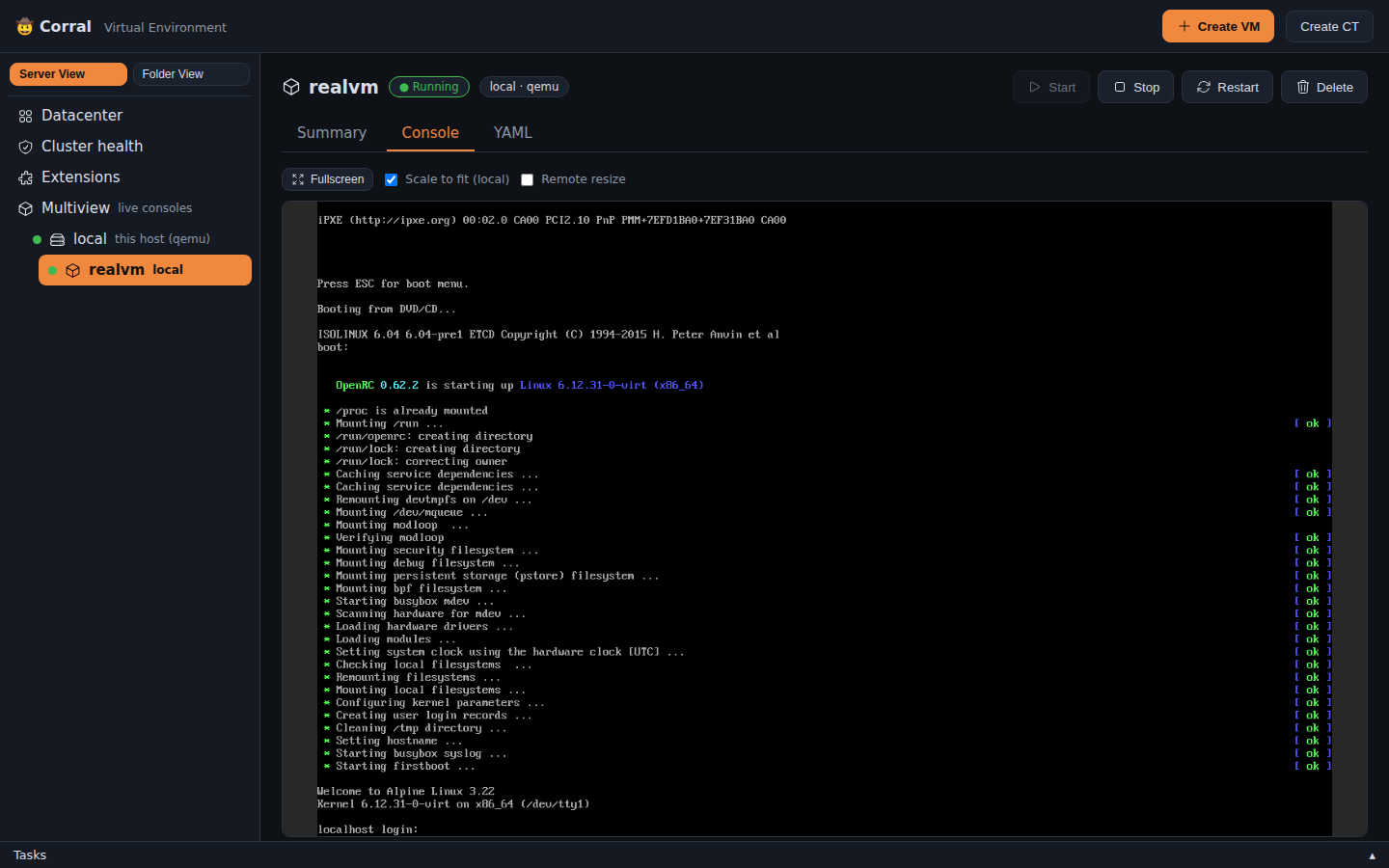
- VNC Display:
corral viewer <vm-name>opens a VNC session. In the Web UI,noVNCshows the display in the browser, with nothing to install. - Interactive TTY / SSH:
corral ssh <vm-name>orcorral tty <ct-name>connects your terminal directly into guest shell namespaces (via SSH,virtctl console, orincus exec).
3. Bootable Container Images (bootc)
Boot containers directly as VMs using the bootc plugin:
corral plugin install bootc
corral bootc create my-node --image quay.io/centos-bootc/centos-bootc:stream9
- Builds a bootable OS disk on the cluster with
bootc install to-disk. - Upgrade the OS image of a guest with
corral bootc upgrade <vm-name>.
Testing a bootc image (corral vmtest)
corral vmtest boots an image locally and tests it. It needs no plugin, and
it is what a CI pipeline should call:
corral vmtest gate --bootc ghcr.io/tuna-os/yellowfin:latest \
  --user tester --password hunter2 --sudo-user \
  --check 'systemctl --failed --no-legend'
ssh -i corral-vmtest-out/ssh/id_ed25519 -p 2242 tester@127.0.0.1
The run leaves the VM up, so the next step tests a real machine over SSH.
It also writes the guest's serial console, a screenshot of every stage of the
boot, an optional WebM timelapse, and result.json. Accounts, passwords,
packages and first-boot hooks go into a layer built on top of the image, which
is never modified. Full reference:
docs/ci-boot-gate.md.
4. Proxmox VE API Compatibility Layer
Corral includes a layer that emulates the REST API of Proxmox VE (/api2/json/...). With it, Terraform (bpg/proxmox), Ansible, and Proxmoxer tools can manage KubeVirt and Incus instances natively.
corral plugin install proxmox
corral proxmox serve --addr :8006
5. Plugin Marketplace
Expand Corral with lightweight marketplace plugins:
# Browse marketplace
corral plugin search

# Installed plugins
corral plugin list

# Plugin management
corral plugin install <name>
corral plugin remove <name>
Available Plugins:
bootc: Builds VMs from bootable container images.proxmox: Compatibility server for the REST API of Proxmox VE.backup: S3/R2 VM disk backup & restore.snapsched: Automated schedules for VM snapshots, with retention rules.schedule: VM autostart and shutdown cron windows.gpu: GPU / PCI passthrough, via discovery of the device plugin.windows: First-class creation of Windows VMs (UEFI, TPM, virtio drivers).vdi: Desktop pools for Virtual Desktop Infrastructure (VDI).
4. Diagnostics & Troubleshooting
Run corral doctor to diagnose cluster capabilities, hypervisor support, and storage drivers:
corral doctor
In a multi-context setup it diagnoses every configured QEMU, KubeVirt, Incus,
libvirt, and Proxmox target. Use corral doctor --context NAME for one target. The
complete capability matrix and the direct-versus-relayed networking behavior
are in backend-support.md.
✓ KubeVirt installed (v1.8.2)
✓ CDI containerized data importer available
✓ Default StorageClass supports volume expansion
✓ VolumeSnapshotClass available for backups
✓ QEMU KVM hardware acceleration (/dev/kvm) accessible
✓ Incus daemon socket (/var/lib/incus/unix.socket) active
Reproducible screenshots
Documentation captures use the real demo fleet that is built in. They are automated for both Chromium and the Bubble Tea TUI:
npm install --prefix e2e
node scripts/capture-docs.mjs docs/screenshots/generated
The same command can target the TunaOS site checkout:
node scripts/capture-docs.mjs ../docs/static/img/screenshots/corral.
The Screenshots workflow runs this script when the web UI, the TUI or the
demo fleet changes, and one time each week. It then opens a PR with the new
images. When the TUNAOS_DOCS_TOKEN secret is set, it also opens a PR in
tuna-os/docs. That PR updates the images on the TunaOS site.