index
Herd your VMs — and containers — into your tailnet.
Your VMs have escaped. Quick ones sit on your laptop, and big ones sit on the Kubernetes cluster in the closet. There is an Incus server that's too useful to replace, and a libvirt host that answers over SSH. There is also a Proxmox node that you still mean to retire one day. Five sets of tooling, five networking stories, and none of it reachable from the couch.
Corral fixes that. One command works on every backend: local QEMU/KVM, KubeVirt, Incus, libvirt, Proxmox VE, or a federated Corral peer. And every VM lands inside the one network that all your devices already share — your Tailscale tailnet.
corral create web --kubevirt --container-disk quay.io/containerdisks/fedora:42
corral ssh web        # from this machine, your laptop, or your phone's terminal
VMs are cattle. Don't treat each one like a networking project.
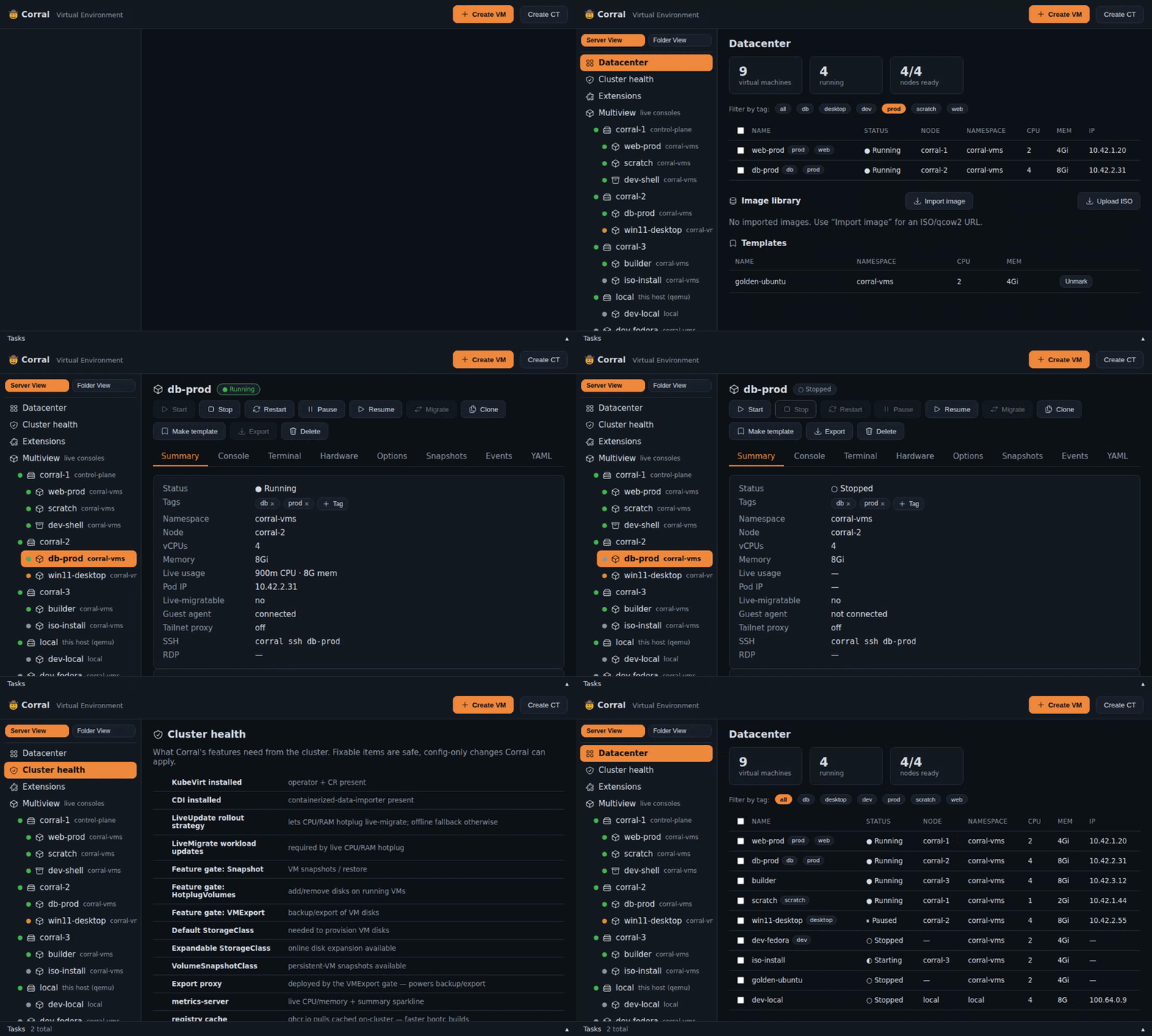
↑ that's corral web --demo — try the whole dashboard yourself in 30 seconds, no cluster needed.
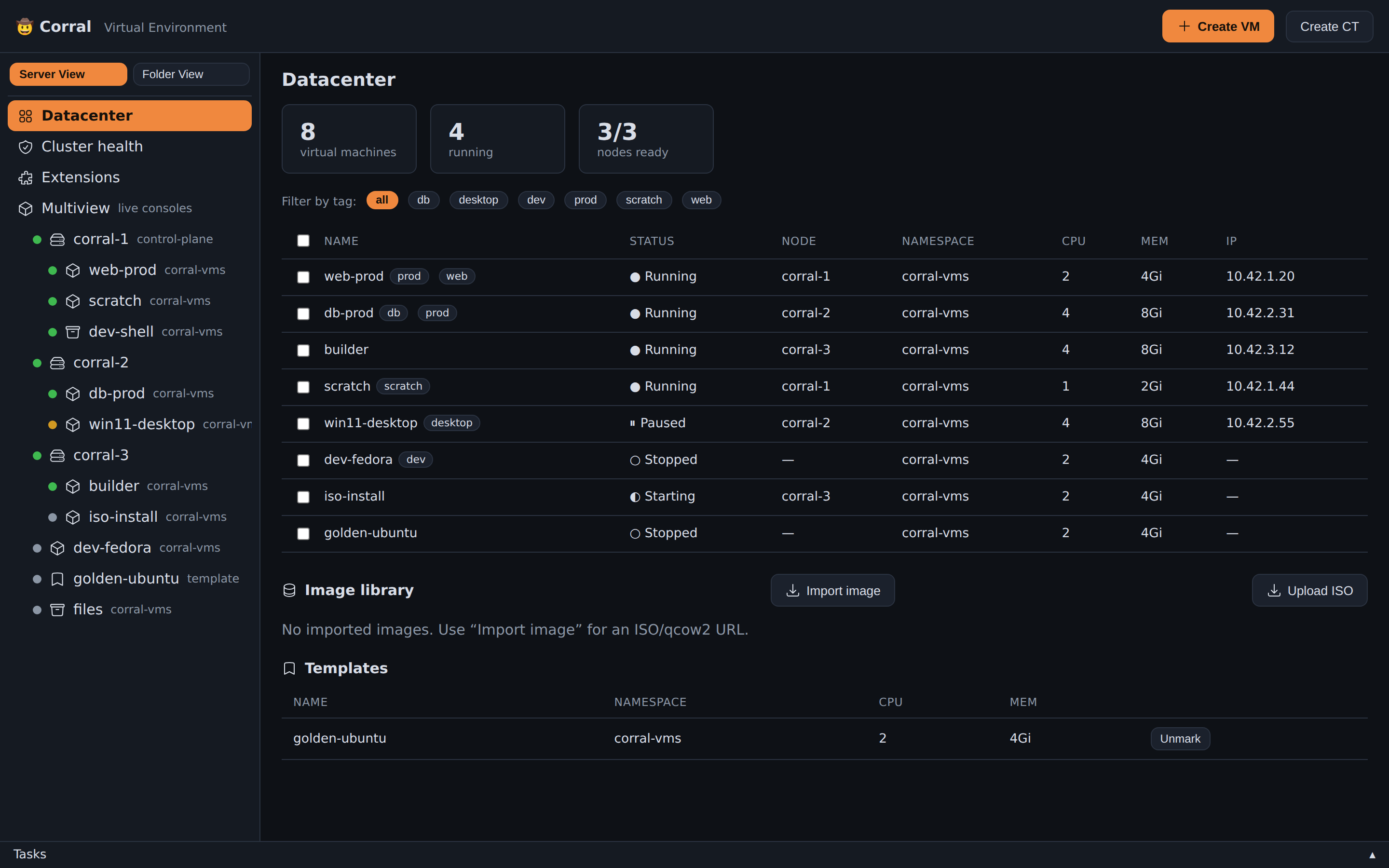
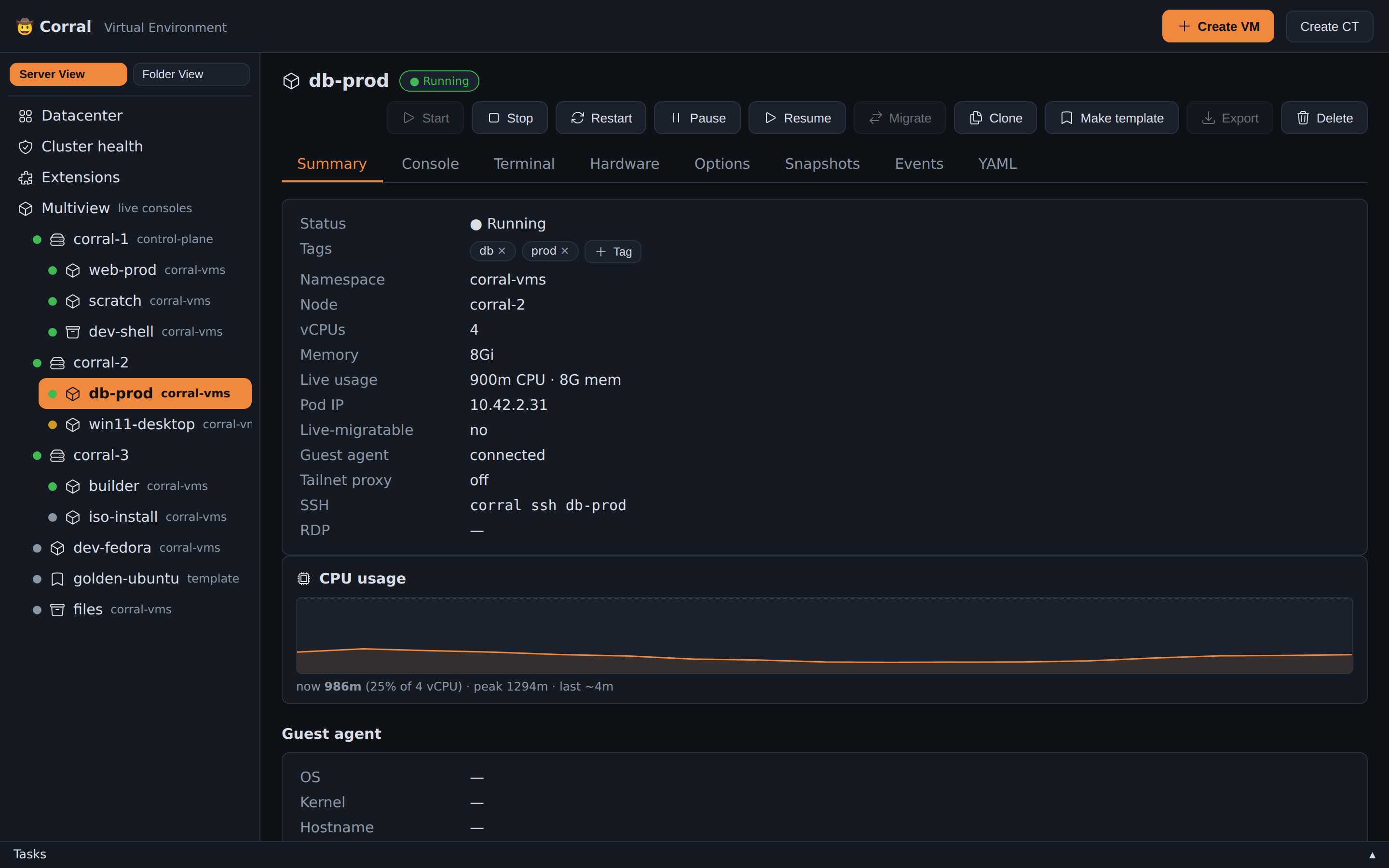
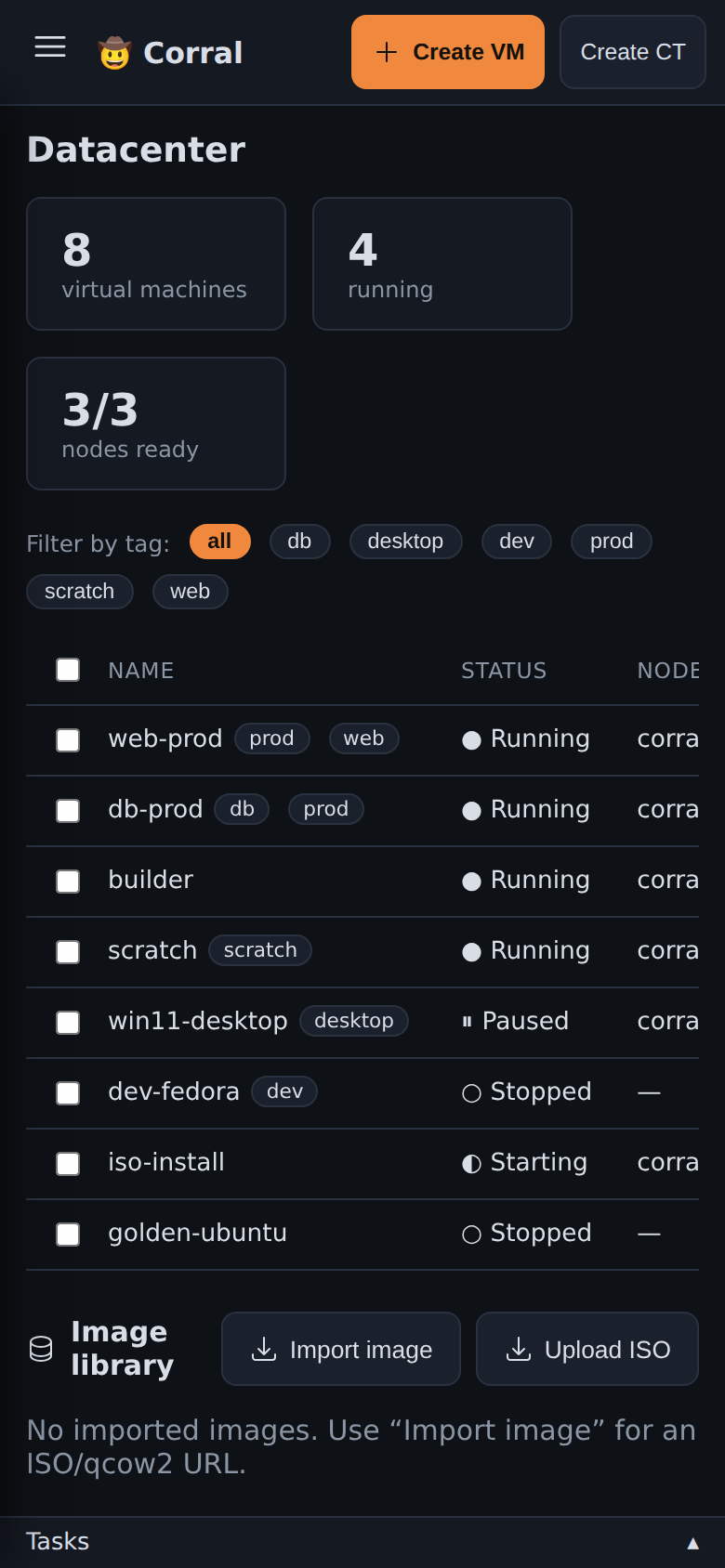
Screenshots: datacenter view, VM summary with live CPU, mobile view
Why you'll like it
- Same commands everywhere.
create/start/ssh/viewer/clone/deletework the same on every backend context. That means local QEMU/KVM, KubeVirt on your cluster, Incus, libvirt, or a federated Corral peer. A peer tries advertised or direct guest endpoints first, and falls back to an HTTP/WebSocket relay. See the backend support matrix. Corral remembers which is which, so you never specify it again. - One fleet, not five tabs. Corral aggregates every configured context at
once.
corral list, the TUI and the dashboard show the whole fleet.corral context use NAMEonly chooses where new work lands. It never hides the rest, and it never mutates kubectl's or Incus's own global config. Authentication stays boring on purpose. It reuses an existing Incus remote's trust, aqemu+ssh://URI through your OpenSSH agent and config, or a PVE API token.corral doctorruns scoped checks against every target and--context NAMEnarrows it to one. - Move a VM to a different backend.
corral move <vm> --to <backend>exports the disk, converts it, and ingests it on the destination. Then it verifies the result. It's cold and never pretends otherwise — the guest stops, andcorral migrateremains the live, within-one-backend kind. Preflight refuses before it touches anything. It reports every reason at once: firmware, disk bus, free space, the new MAC/IP.--dry-runonly prints the plan. Corral leaves the source stopped, not deleted unless you pass--delete-source. Disk export works on every backend on its own too — qcow2, raw.gz, or an Incus tarball. See ADR-0010. - Your OS is a container image. Point Corral at a bootable container
(
corral create dev --bootc ghcr.io/...). Corral builds the OS disk on-cluster withbootc install to-disk, then boots it as a first-class VM.corral bootc upgraderolls the VM to the image's next build — so your fleet of VMs updates the same way containers do. No other VM platform has this. - A bootc image tester for CI.
corral vmtest --bootc ghcr.io/...builds the image into a disk and boots it. It waits for the guest, runs your assertions, then hands the VM over for your own tests. Test accounts, passwords, extra packages and a boot hook go into a layer above the published image. corral never changes that image. It writes the evidence as it goes: the serial console, screenshots of the boot, a timelapse, andresult.json. It measures whether the screen painted at all. A desktop that boots to nothing therefore fails. Each failure class gets its own exit code. A pipeline can then tell a runner with no KVM from an image that will not boot. See docs/ci-boot-gate.md. - Containers (CT) — distrobox on Kubernetes. Proxmox-style pet pods
alongside VMs (
corral ct create). A privileged CT seeds a full root filesystem onto its own volume, andchroots into it on boot. Soapt/dnf/apkinstalls and dotfiles survive Stop/Start. It works the same way in a real distrobox container when you stop it and enter it again. Unprivileged (default) CTs get only a simple mount of/datainstead. - SSH that works out of the box. Corral injects your public key at create
time. It also generates a fallback password and stores it locally.
corral sshpicks the right path: a Kubernetes API tunnel for cluster VMs, a Tailscale-bound port-forward for local ones. Or use--vsockfor QEMU AF_VSOCK transport on live ISOs. It changes no config files. - VMs that join the tailnet themselves. Drop a Tailscale auth key in
~/.config/tailvm/config.yaml(orTS_AUTHKEY). Then every cloud-init VM runstailscale upon first boot. It shows up as a real machine on your tailnet, MagicDNS name and all. - Extensions with a marketplace. Niche features ship as plugins:
corral plugin search, thencorral plugin install bootc. Thencorral bootc create dev --image ghcr.io/...builds an OS disk on the cluster from a bootable container image. It boots that disk as a VM. Browse/install from the web UI's Extensions tab too. The core binary stays lean. - Point-and-shoot TUI. Run
corralbare for a Bubble Tea interface. Pick a VM and hit Start / Stop / SSH / VNC / Delete. Browse and restore snapshots on any backend that has them, or read a VM's events. Mark a template, or resize CPU/RAM (VMs and CTs). Toggle which ports (SSH, VNC, RDP, HTTP, …) Corral publishes to the tailnet as<name>-vm.your-tailnet.ts.net. - A Proxmox-style web UI.
corral webserves a dark, mobile-friendly dashboard. It has a datacenter → node → VM tree, live status, a create wizard, and start/stop/restart/pause. It offers one-click live migration with a target-node picker, and multi-select bulk start/stop. It shows tags (chips + tree filter) and a per-VM CPU usage sparkline. It does disk export (qcow2 or raw.gz). You can add your own image/ISO sources alongside the built-in catalog, and Corral saves them in a ConfigMap. And it gives you real consoles in the browser: noVNC graphics and an xterm.js serial TTY. It also runs on the cluster itself (deploy/corral-web.yaml), and the Tailscale operator exposes it to your tailnet. CLI, TUI, and web all share the same state. - One static binary, written in Go. No daemons, no controllers to install, no
client-side K8s SDK. It drives
kubectl/virtctl/systemctl— the tools you already trust — and gets out of the way.
Install
One line does it all. The script detects OS/arch and verifies the download
against the release's SHA256SUMS. It installs the newest binary, rebuilt on
every push, to ~/.local/bin, and wires up shell completions (bash/zsh/fish).
It works on Linux and macOS, amd64 and arm64:
curl -fsSL https://raw.githubusercontent.com/tuna-os/corral/main/scripts/install.sh | sh
…or via brew (Linux & macOS)
Tagged releases land in the tuna-os tap,
so brew upgrade keeps you current. The formula is corral-vm (homebrew/core
already has an unrelated corral), but it still installs the corral command:
brew install tuna-os/tap/corral-vm
…or grab the binary yourself
This release rolls forward: CI rebuilds it from main on every push. It is
not a CI artifact, so there is no GitHub login or expiry:
curl -fsSL -o corral \
  "https://github.com/tuna-os/corral/releases/download/binaries/corral-linux-$(uname -m | sed 's/x86_64/amd64/;s/aarch64/arm64/')"
chmod +x corral
install corral ~/.local/bin/
…or via go install
go install github.com/tuna-os/corral@latest
…or build from source
git clone https://github.com/tuna-os/corral
cd corral
go build -o corral .
install corral ~/.local/bin/
…or pull the container image
The same image that runs corral web in-cluster also ships the CLI binary.
The image is available for both linux/amd64 and linux/arm64.
podman create --name corral-extract ghcr.io/tuna-os/corral:latest
podman cp corral-extract:/usr/local/bin/corral .
podman rm corral-extract
install corral ~/.local/bin/
Optional: corral completion fish | source (bash/zsh/fish, via Cobra).
Run the dashboard as a service. One command installs a systemd unit so
corral web starts at boot and restarts on failure:
corral web service install                  # per-user unit (no root)
corral web service install --system \        # or machine-wide (run under sudo)
  --addr "$(tailscale ip -4):8006"
corral web service status                    # / uninstall / print
For a per-user unit to run after you log out, enable linger:
sudo loginctl enable-linger "$USER".
Development tasks run through just, and a
bare just lists them. They include build, test, vet, ci (the
pre-push gate), and regen-catalog. That last one refreshes the Universal
Blue / Bluefin / TunaOS bootc catalog from ghcr. It drops any image with no
rebuild in ~60 days.
Try it in 30 seconds — no cluster needed
--demo runs everything against a built-in fake cluster (a varied VM fleet,
containers, nodes, live metrics — start/stop/create/delete all work):
corral --demo                # the TUI, populated
corral web --demo            # the Proxmox-style dashboard at http://127.0.0.1:8006
corral list --demo           # any CLI command works too
You can also run the dashboard in a browser with no install. Use just web-demo
to build a static demo site. See web-demo/README.md.
Quick start
# Local VM on this machine (QEMU/KVM, runs as a systemd user service)
corral create scratch --iso ~/Downloads/ubuntu-24.04.iso
corral start scratch            # VNC + SSH bound to this host's Tailscale IP

# Cluster VM (KubeVirt) from a container disk
corral create web --kubevirt --container-disk quay.io/containerdisks/ubuntu:24.04
corral start web
corral ssh web

# Cluster VM from an installer ISO (CDI imports it for you, progress in `corral list`)
corral create bluefin --kubevirt --iso https://download.example/bluefin.iso

# Bootable container → running VM, disk built on-cluster (bootc extension)
corral plugin install bootc
corral bootc create dev --image quay.io/centos-bootc/centos-bootc:stream9
corral start dev && corral ssh dev -u root

# Everything, both backends, one table
corral list

# Container (CT) — distrobox-style persistent rootfs
corral ct create devbox --image docker.io/library/debian:bookworm --privileged
corral ct console devbox

# Container (CT) from a project's devcontainer.json
corral ct create myproj --devcontainer ./myproj
How VMs are reached
| Local (qemu) | Cluster (kubevirt) | |
|---|---|---|
| SSH | host's Tailscale IP, forwarded port | virtctl ssh API tunnel — works with zero exposure |
| VNC | host's Tailscale IP, vnc://… | virtctl vnc proxy |
| Published ports | — (host is already on the tailnet) | per-VM proxy Service tagged tailscale.com/expose → <name>-vm.<tailnet>.ts.net |
| VM on the tailnet itself | — | automatic via cloud-init when an auth key is configured |
Corral never binds anything to 0.0.0.0. Ports of local VMs attach only to
the host's Tailscale IP.
Extensions & the marketplace
Corral has a krew-style plugin system. Plugins are standalone corral-<name>
binaries in ~/.local/share/corral/plugins; once installed they run as
corral <name> …. A curated marketplace (marketplace/index.json) lists
installable ones:
corral plugin search
corral plugin install bootc
corral plugin list
The web UI has an Extensions tab to browse and install the same plugins.
The bootc plugin
The flagship extension, corral bootc, turns a bootable container image into a
VM that runs, without any local tooling:
- Corral provisions a block-mode PVC. Then it runs a short-lived builder
VM (not a pod) that runs
bootc install to-diskonto it. So the VM's own kernel does the filesystem work. That lets it install images that the node kernel can't handle. An example is Universal Blue desktops (bluefin/dakota) that need btrfs + composefs. Corral auto-detects the right backend (ostree vs composefs) and filesystem from the image. It bakes in your SSH key and enables sshd. - Build logs stream to your terminal live.
- The finished disk is self-bootable (GPT + ESP + bootloader), so the final VM UEFI-boots it — no kernelBoot, no bootloader gymnastics.
corral bootc rebuild|upgrade|switch re-bakes the disk from a new image
(Corral applies the SSH key again across the --wipe). Rebuild your OS in CI,
corral create it as a VM in minutes.
Faster builds: deploy deploy/registry-cache.yaml (an on-cluster
pull-through cache for ghcr.io). The builder then pulls images through it
automatically, with no config. To turn it off, set
CORRAL_REGISTRY_MIRROR=off.
The backup plugin
corral backup ships VM disk backups to any S3/R2 bucket via rclone —
on-demand or scheduled entirely in-cluster (no workstation required):
corral backup create web --dest r2:backups/corral      # export + upload
corral backup restore web-restored --src r2:backups/corral/web-….img.gz --size 20Gi
corral backup list --dest r2:backups/corral

corral backup schedule web --every 24h --keep 7 --to r2:backups/corral  # in-cluster CronJob
corral backup schedules                                                # list schedules
corral backup unschedule web
Needs rclone configured for your remote (rclone config) and virtctl.
Scheduled backups run as non-root in the pinned rclone/rclone image.
An init container copies kubectl and downloads virtctl into a
shared volume, so no corral-owned image is necessary. Your local rclone
config goes into a namespaced Secret that the CronJob mounts.
The Windows plugin
corral windows sets up UEFI/TPM/virtio for a first-class Windows guest.
KubeVirt VMs default to a Linux-tuned devices set, and Windows Setup can't
boot from it without extra help:
corral plugin install windows
corral windows create win11 --iso https://example/Win11.iso --cpu 4 --mem 8Gi
The plugin imports the installer ISO via CDI. It provisions a UEFI+TPM+q35 VM with Hyper-V enlightenments. It attaches the virtio-win driver ISO as a second CD-ROM, so Setup can see the virtio disk/network. It also sets up proper access to the console.
The VDI plugin
corral vdi — desktop pools. Phase 1 of RFC-0001:
clone an already-built VM into a pool, hand members to users, connect,
release, delete. Full setup guide: docs/vdi.md.
corral plugin install vdi
corral vdi pool create devpool --from golden-desktop --size 3
corral vdi assign devpool alice
corral vdi connect devpool-1
corral vdi unassign devpool-1
There is no broker, no self-serve web page, and no idle reclaim yet. See the RFC and issue #69 for what's next. Pool membership and assignment are plain K8s labels on the VM objects, nothing more.
Bootc images as a CI boot gate
corral create --bootc runs entirely on local QEMU — no cluster, no
tailnet — which makes it a one-command boot gate for bootc images on any
KVM-capable runner. --wait-ssh turns the exit code into the verdict:
corral create gate --bootc ghcr.io/tuna-os/yellowfin:gnome-testing \
  --wait-ssh --timeout 900
# exit 0  → image booted and answers SSH (key injected for root at install)
# exit ≠0 → it didn't; fail the pipeline
corral delete gate
The same thing, declaratively (corral reads Lima-style YAML natively):
# verify.yaml
bootc: ghcr.io/tuna-os/yellowfin:gnome-testing
cpus: 4
memory: 4GiB
disk: 30GiB
provision:
  - mode: system
    script: |
      #!/bin/sh
      systemctl enable sshd
corral create gate -f verify.yaml --wait-ssh --timeout 900
Corral chroots provision scripts into the installed disk before first
boot. So they can enable services, drop test users, or plant readiness
markers. The published image stays untouched. Corral installs the disk with
bootc install to-disk --generic-image, so it boots under plain
SeaBIOS/OVMF anywhere.
On GitHub-hosted runners, enable KVM first:
- run: |
    echo 'KERNEL=="kvm", GROUP="kvm", MODE="0666", OPTIONS+="static_node=kvm"' \
      | sudo tee /etc/udev/rules.d/99-kvm4all.rules
    sudo udevadm control --reload-rules && sudo udevadm trigger --name-match=kvm
Ephemeral VMs & garbage collection
Scratch/build VMs are easy to create and easy to forget: a --bootc
builder, a one-off boot-gate test, a CI throwaway. They don't clean
themselves up if you Ctrl+C out or walk away. --ephemeral marks a VM for
corral gc, so you don't have to remember it:
corral create scratch --kubevirt --image bluefin --ephemeral --ttl 2h
# ... time passes, nobody comes back for it ...
corral gc              # stops it — PVCs and disk state survive
corral gc --dry-run     # preview without touching anything
Two stages, on purpose:
- TTL expires → stopped. This frees the scarce resource (cluster
CPU/RAM) at once. The disk stays untouched. If you did need the VM after
all,
corral start scratchbrings it right back. - Stopped by gc, past the grace period (default 72h,
--delete-afterto change it) → deleted. VM and PVCs, for real. Only VMs that gc itself stopped are eligible. If you stop one yourself, this clock doesn't start. So gc never sweeps up an intentionally-parked VM by surprise.
Run corral gc by hand, or point a CronJob at it for hands-off cleanup. gc
never touches a VM without --ephemeral.
Dev containers (scoped MVP)
corral ct create --devcontainer <path> reads a project's
.devcontainer/devcontainer.json and provisions a Container (CT) from it. It
reads image, postCreateCommand, remoteUser, and forwardPorts. If the
file uses build.dockerfile in place of image, you get an error that points
you at --image:
corral ct create myproj --devcontainer ./myproj
corral ct console myproj
<path> is the devcontainer.json itself, or a directory that contains
.devcontainer/devcontainer.json/.devcontainer.json. The CT runs
privileged (persistent rootfs) by default, because that's the whole point of
a dev container. Pass --privileged=false to turn that off. Any of
--image, --cpu, --mem, etc. still override what the json would
otherwise set.
This is a scoped MVP, not full devcontainer-spec/VS Code support. Corral
does not support Features, build.dockerfile, or postCreateCommand's
object form (several named commands that run in parallel). The issue that
tracks this work has the fuller story. For example, VS Code's "Reopen in
Container" could recognize Corral natively.
Configuration
# ~/.config/tailvm/config.yaml
tailscale:
  auth_key: tskey-...   # or export TS_AUTHKEY; flag --ts-authkey overrides
corral config shows what's active. State lives in
~/.local/share/tailvm/ (registry + local VM disks). The legacy tailvm
tool shares this directory, so existing VMs still work.
Environment overrides (handy for the in-cluster web deployment):
| Variable | Effect |
|---|---|
CORRAL_NAMESPACE | default VM namespace (code default: corral-vms) |
CORRAL_ADMINS | comma-separated tailnet logins allowed to mutate; unset = single-user/open (see Web UI) |
CORRAL_REGISTRY_MIRROR | override/disable (off) the bootc builder's pull-through cache host |
CORRAL_BOOTC_BUILD_TIMEOUT | minutes to wait for a bootc builder VM (default 45) |
Web UI
corral web                                  # http://127.0.0.1:8006
corral web --addr "$(tailscale ip -4):8006" # share with your tailnet
Or serve it from the cluster (public image built by CI to ghcr.io/tuna-os/corral):
kubectl apply -f deploy/corral-web.yaml
# → https://corral.<tailnet>.ts.net
Setting up from scratch? Build your own KubeVirt "Proxmox" walks through the whole stack — KubeVirt + CDI, the feature gates, Longhorn + snapshots, Multus, and Corral itself.
Tailnet membership is the authentication — never bind a public interface.
For authorization, set CORRAL_ADMINS to a comma-separated list of tailnet
logins. Listed users can mutate; everyone else gets a read-only UI, and the
API rejects any call from them that mutates state (403). Unset =
single-user/open (the default). Identity comes from the Tailscale ingress headers — see
ADR-0003. Feature roadmap:
SPEC.md and docs/api.md.
Command reference
corral                  TUI (VMs and Containers side by side)
corral web              Proxmox-style web UI [--addr host:port]
corral doctor           cluster health checks, --fix for safe auto-fixes
corral list             all VMs, every configured context
corral context          get | use <name> | add <name> --backend <bck> | list | rm <name>
corral create <name>    --kubevirt | (default: local qemu)
                        --mem 4G --cpu 2 --disk 20G --iso … --container-disk …
                        --pvc … --node … --cloud-init … --instancetype … --ts-authkey …
                        --storage-class … --ephemeral --ttl 4h
                        --lan | --network-nad ns/name [--bridge-iface net1]  (LAN bridge NIC)
corral gc               [kubevirt] [--dry-run] [--delete-after 72h]
                        stop --ephemeral VMs past their --ttl (PVCs kept),
                        delete them once stopped past --delete-after
corral clone <src> <dst>  [kubevirt] clone a VM's disk + config to a new name
corral plugin           search | install <name> | list | remove <name>   (extensions)
corral start|stop <name>
corral restart <name>   restart a VM
corral pause|unpause    [kubevirt] freeze / resume a running VM
corral scale <name>     [kubevirt] --cpu N --mem 8G (live hotplug when possible)
corral migrate <name>   [kubevirt] --node X  live-migrate to another node
corral move <name>      --to <backend> cold cross-backend move (export →
                          ingest → verify); --dry-run, --delete-source
corral adddisk <name>   [kubevirt] --size 10Gi  hotplug a new disk
corral rmdisk <name>    [kubevirt] --volume PVC  detach a hotplugged disk
corral snapshot …       [kubevirt] create | ls | restore | rm
corral networks         [kubevirt] list Multus NetworkAttachmentDefinitions
corral addnic <name>    [kubevirt] --network-nad ns/name --iface net1
                          bridge a LAN NIC onto an existing VM
corral ssh <name>       [-u user] [-i key] [-c cmd] [-p port] [--password …]
                          [-L [bind:]port:host:hostport ...]  local port forward(s)
corral viewer <name>    VNC via xdg-open
corral logs <name>      journald (local) / virt-launcher (cluster)
corral info <name>      raw JSON
corral delete <name>    [-f] removes VM, disks, proxy, registry entry

corral ct create <name>  --image … [--cpu 1] [--mem 512Mi] [--disk 5Gi]
                          [--privileged]  (distrobox-style persistent rootfs)
                          --devcontainer <path>  (scoped MVP — see below)
corral ct list|start|stop|delete|console <name>

corral vdi pool create <name> --from <golden-vm> --size N   (plugin, desktop pools)
corral vdi pool list|delete <name>
corral vdi assign <pool> <user>
corral vdi unassign <member>
corral vdi connect <member>
KubeVirt feature support & cluster requirements
Corral exposes the Proxmox-style operations above through both the CLI/TUI and the web UI (editable Hardware tab, Snapshots tab, in-browser consoles). What works depends on the cluster:
- Change CPU / RAM — always works. On a VM that is truly
live-migratable, Corral hotplugs the change with no downtime. Otherwise
Corral applies it in a single stop→patch→start. Corral creates new VMs
sockets-based, with
maxSockets/maxGuestheadroom, so they can hotplug. - Live migration / live hotplug — needs
vmRolloutStrategy: LiveUpdateand masquerade networking (Corral sets this). It also needs migratable storage (RWX), and a target node with the same CPU vendor. You cannot live-migrate a VM between an Intel host and an AMD host while it runs. On a mixed-vendor cluster, Corral detects this and falls back to the offline path, so it does not hang. - Add disk (hotplug) — needs the
HotplugVolumesfeature gate. - Online disk expansion — needs a StorageClass with
allowVolumeExpansion: true. - Snapshots / clone / restore — need a
VolumeSnapshotClassfor VMs with persistent disks (ephemeral container-disk VMs can snapshot their definition without one). The web UI greys out controls the cluster can't support.
Full design document: SPEC.md.
Documentation
CONTRIBUTING.md— how to build and test (just ci, the-tags bootcset), code style, and how to submit a changeSPEC.md— full specification (commands, flags, types, backends, registry)docs/api.md— the complete reference for the REST APIdocs/architecture.md— package map, design decisions, data flow, build systemdocs/backend-support.md— what each backend context can do (local QEMU, KubeVirt, Incus, libvirt, Proxmox VE, Corral peer)docs/backend-parity.md— per-operation parity matrix, generated frompkg/backend.Matrixand enforced by conformance testsdocs/ci-boot-gate.md— how to gate CI publishes on bootc images that boot (QEMU + KubeVirt), with field-tested fixes for failuresdocs/kubevirt-proxmox-setup.md— from-scratch KubeVirt + Longhorn + Corral setup guidedocs/testing.md— test strategy & plan (unit, integration, E2E)docs/vdi.md— setup guide for the VDI plugin (desktop pools)docs/vdi-epic-status.md— status of the VDI epic: dependency chain & hardware gates (#69)docs/rfc/0001-vdi-plugin.md— VDI plugin design + phased roadmap
Requirements
- Local backend:
qemu-system-x86_64+ KVM, systemd user session - Cluster backend:
kubectlcontext with KubeVirt (+ CDI for ISO import),virtctl; Tailscale operator for published ports tailscaleon the host;sshpassonly if you use password SSH
Why "Corral"?
A corral is one fence that holds the whole herd. Your VMs are the cattle;
your tailnet is the fence. (Formerly known as tailvm.)
Community
Contribute compute — no code needed
No time to write code? You can still push this project's backlog forward. TunaOS AI-agent hives work on this repository. Lend a hive your AI subscription or API tokens, and your machine runs contributor tasks from this project's backlog.